PrivX Microservice Architecture
PrivX has been built around modular microservices architecture. All the microservices communicate with each other using REST APIs and trigger content update notifications through PostgreSQL. PrivX can be deployed to run either on an on-premise host or on an cloud instance.
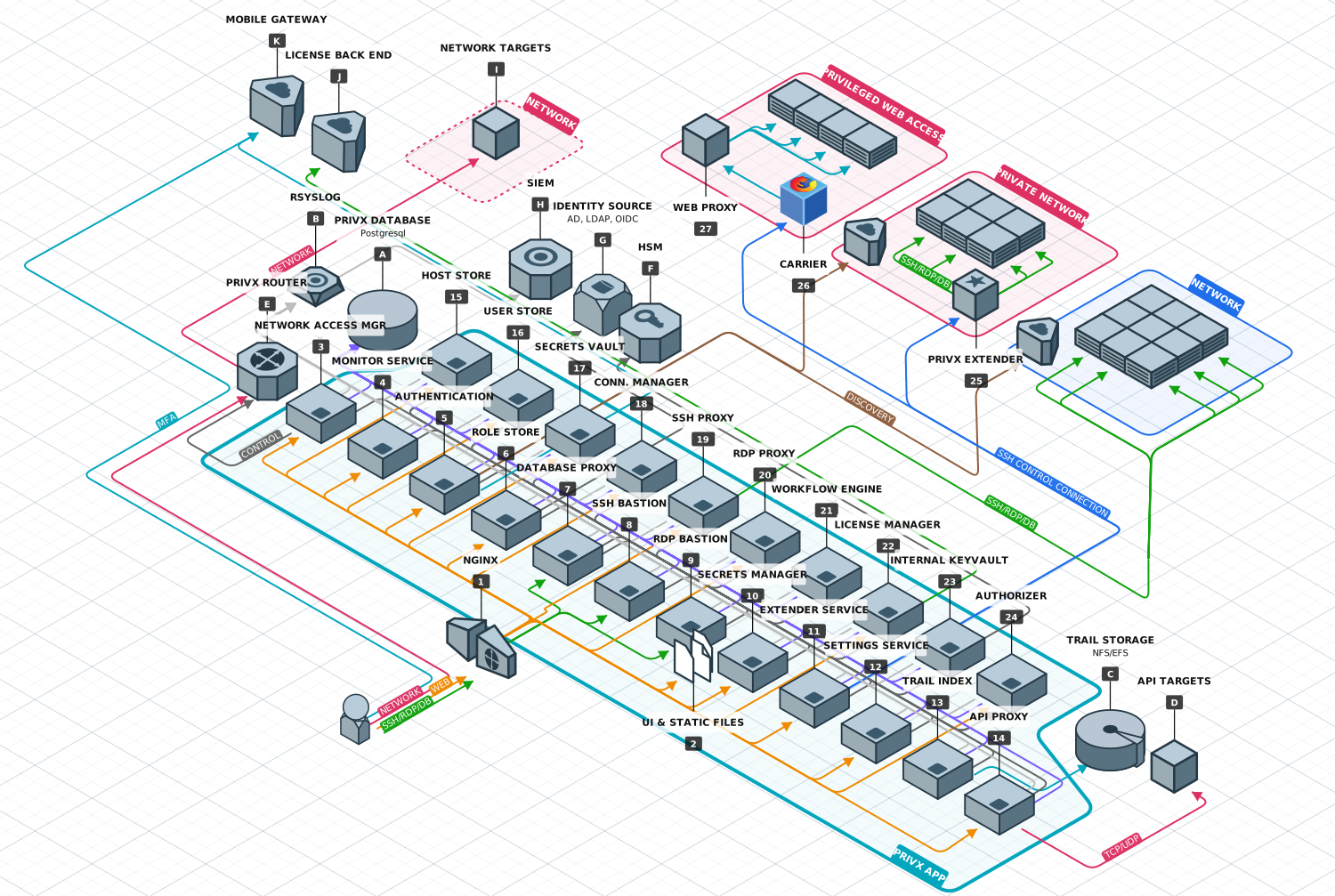
Components
See the following sections for more information on the PrivX microservices.
-
Nginx Nginx is an open source HTTP server and reverse proxy. It routes traffic from the public facing 443 and 80 ports to individual PrivX microservices. It also routes internal microservice TLS traffic. It also serves static files. All traffic is HTTPS apart from Windows Certificate Revocation List requests which in accordance with Microsoft implementation must be over HTTP port 80. All external and internal communication is through REST APIs.
-
UI & Static files Nginx serves the static files from /www/data -directory on the PrivX host. The files consist of the HTML5 javascript UI and accompanying HTML, CSS and image files. The UI will function on top of PrivX through REST APIs.
-
Network Access Manager Network Access Manager manages network targets. When a user requests network access, Network Access Manager resolves the user and target addresses, then configures PrivX Routers to establish a connection between the two.Network Access Manager also handles validating user access, tracking network connections, and automatically terminating expired network connections.
-
Monitor Service The Monitor Service collects health data and audit events from PrivX microservices and associated extenders.
-
Authentication The Authentication microservice authenticates clients and users to PrivX system via OAuth2. It will authenticate the requesting client either against the local user store or a specified remote user source such as an Active Directory, LDAP or Open ID Connect provider.
-
Role Store The Role Store integrates to both user providers and to identity sources. It essentially fetches users from remote sources and maps the users to PrivX roles according to pre-defined rules or explicit role grants. Other microservices will query Role Store for user's roles on on-demand basis. The role store will also fetch target hosts from cloud providers and push them to host store. Role Store keeps discovered users and mapped roles in-memory for fast access and resolving.
-
Database Proxy Database Proxy enables native-client connections to databases. Supports clients and databases using mysql and postgres protocols. Also supports other protocols in passthrough and TLS mode.
-
SSH Bastion SSH Bastion routes native client SSH connections to target hosts according to user's role configuration. The connections can be established either by using a bastion syntax or via interactive menu within the bastion. Connections can be audited. The bastion can connect to the target host directly or via the PrivX extender.
-
RDP Bastion RDP Bastion routes native client RDP connections to target hosts according to user's role configuration. The connections can be established either by using a bastion syntax or via interactive menu within the bastion. Connections can be audited. The bastion can connect to the target host directly or via the PrivX extender.
-
Secrets Manager The Secrets Manager handles storing secrets in PrivX, and role-based access to those secrets.
-
Extender Service The Extender Service on PrivX Servers allows connecting to network targets. When receiving a valid and authenticated connection request, the Extender service opens a connection to the destination through the specified PrivX Extender.
-
Settings Service Settings service stores PrivX installation-specific settings and offers them up for other microservices.
-
Trail Index Trail Index microservice provides on-demand searching within the trail files stored in Audit Trail Storage.
-
API Proxy The API Proxy forwards API connections to API targets. PrivX users can access API targets using native API clients. Authorization to API targets is provided by the users' roles in PrivX.
-
Host Store The Host Store stores all locally added hosts as well as hosts discovered from cloud providers. It also keeps track of service, account and role mappings and the proxy microservices will check the host configuration from the host store before allowing access to a target host.
-
User Store The User Store is a PrivX-specific user directory. By default, the initial administrator account is created into the user directory. The User Store allows PrivX to act as a standalone solution and it also allows the creation of temporary users which necessarily need not be created in a user directory upstream from PrivX.
-
Secrets Vault Sensitive material such as passwords and keys can be stored to PrivX via the Secrets Vault API or the PrivX user interface. The secrets are encrypted and stored to the database.
-
Connection Manager The Connection Manager keeps track of all ongoing proxied connections to target hosts. The administrator can also terminate connections, or if the connection was audited, playback the audit trail from the trail storage (27).
-
SSH Proxy SSH Proxy establishes SSH connections to target hosts. It will verify user's roles and check that the roles match the configuration found for the host from the host store. The PrivX UI will establish a websocket connection to the SSH Proxy for the VT100 terminal emulation. If the connection is audited, the SSH Proxy will create a trail file to trail storage (14) and also play it back on Connection Manager's request. The proxy can connect to the target host directly or via the PrivX extender.
-
RDP Proxy RDP proxy establishes RDP connections to target hosts. It will verify user's roles and check that the roles match the configuration found for the host from the host store. The PrivX UI will establish a websocket connection to the RDP Proxy desktop session. If the connection is audited, the RDP Proxy will create a trail file to trail storage and also play it back on Connection Manager's request. The proxy can connect to the target host directly or via the PrivX extender.
-
Workflow Engine The Workflow Engine allows users to request roles and for the approvers to grant or deny role requests. It will also push out email notifications to approvers.
-
License Manager License Manager keep track of the internal license status of the PrivX installation and periodically polls for license updates from the SSH.COM license back end.
-
Internal Keyvault Keyvault microservice stores PrivX internal sensitive data. The sensitive data includes stored credentials, private keys and so forth.
-
Authorizer Authorizer creates the ephemeral certificates needed to access SSH and RDP target hosts via certificate authentication. It will also provide public keys and/or stored credentials from the keyvault to proxies for authentication.
-
Extender PrivX Extender enables PrivX to reach firewalled private networks or virtual private clouds. Once deployed in the private network, it will establish a number of websocket connections (for Extender v1) or SSH tunnels (for Extender v2) to PrivX to route traffic from PrivX proxies to the target network.
-
Carrier PrivX Carrier provides a virtualized runtime environment via Docker for the Firefox containers used for Web Access.
-
Web Proxy PrivX Web Proxy intercepts the traffic from the Firefox containers to the target hosts and provides secrets on the fly.
- PrivX Database
PrivX uses PostgreSQL as the storage mechanism for configuration data such as role mappings as well as manually added users or hosts and discovered cloud hosts. - rsyslog
The PrivX microservices write audit-, debug- and systemlogs to local syslog file. rsyslog (or equivalent) should be configured to transfer the log files to an external SIEM solution (A). - Trail Storage
The audit trail storage is a directory on the PrivX host. Ideally, this directory would be mounted to a secure NFS/EFS solution. - API Targets
PrivX users' native-client API connections are routed to API targets via API Proxy. Authentication and authorization is provided similarly to SSH/RDP connections in a role-based manner. - PrivX Router
PrivX Router enables network-target access. PrivX Routers support both TCP and UDP connections. - HSM
For increased security, PrivX can be configured to save cryptographic keys on an external HSM instead of its internal keyvault. - Identity Source
PrivX can import user and group information from external user directories, such as AD/LDAP, and allow administrators to set up role-based access based on imported information. PrivX is also able to automatically update users' access after any modifications to their account on the external user directory. - SIEM
PrivX audit data can be sent in CEF format to external SIEMs. - Network Targets
PrivX in conjunction with the PrivX Router allows you to provide role-based access to targets using arbitrary TCP/UDP clients. Common network targets include OT devices. - License Back End
PrivX periodically polls the SSH.COM license back end for updates to licensing information. - Mobile Gateway
PrivX can provide multi-factor authentication via PrivX Authorizer - an app developed by SSH Communication Security that allows users to add MFA to their logins, as well as make approvals directly from their approved devices.