Configuring Key Storage Locations with HSM
In PrivX deployments with HSM integration, PrivX performance decreases from factors such as a slow HSM or latency between PrivX and HSM. You can improve PrivX performance by storing some of PrivX's cryptographic keys on PrivX Servers rather than on HSM.
| Type | Location | PrivX Performance | Recommended Environment |
|---|---|---|---|
| Remote (default) | HSM | Slower | Fast HSM with low latency to PrivX Servers |
| Local | PrivX | Faster | Slow HSM, or high latency between PrivX and HSM |
Instance Secret Storage
The PrivX instance secret is the primary encryption key for most sensitive data in PrivX, such as cryptographic keys.
During initial PrivX setup the default location is remote. To use local storage instead, select the option when running the postinstall script. Alternatively, set the environment variable PRIVX_KEYVAULT_LOCAL_INSTANCE_SECRET=1 if running postinstall non-interactively.
Select the PrivX instance secret storage type during initial installation. This setting cannot be changed after installation. Before deploying PrivX to production, we recommend using a separate evaluation deployment to determine which instance secret storage type meets your security and performance requirements.
Remote Storage for Instance Secret
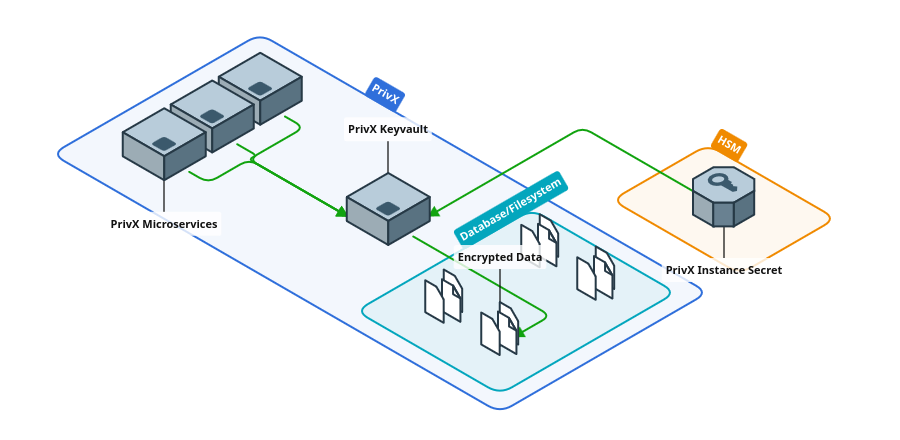
The PrivX instance secret is created on the HSM during installation and never exported to PrivX. The HSM performs all encryption and decryption operations using the instance secret.
This option offers the best security but also considerably reduces PrivX performance.
Local Storage for Instance Secrets
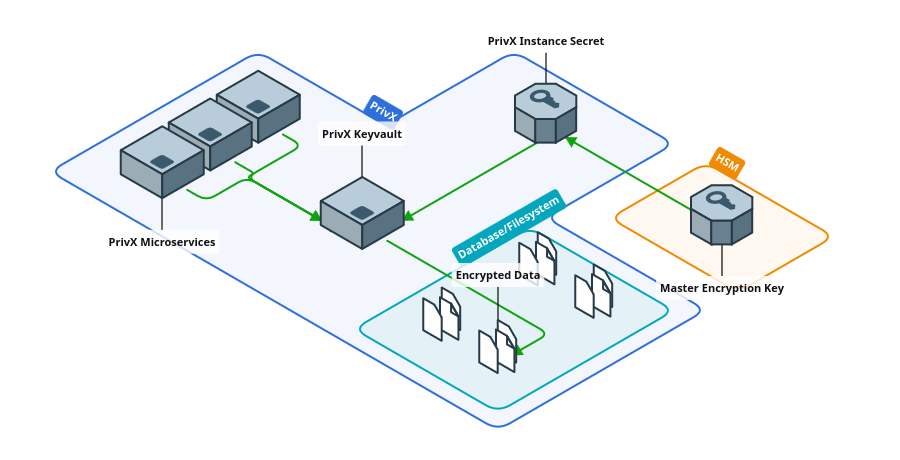
PrivX creates its own instance secret locally and a master encryption key on the HSM. The master encryption key is used to encrypt the instance secret before storing it on disk and to decrypt the instance secret on PrivX startup.
The instance secret is never stored unencrypted on disk or in the PrivX Database. However, it resides unencrypted in program memory during PrivX Server runtime.
This option improves PrivX performance over the remote instance secret, while still allowing HSM integration.
Cryptographic Key Storage
PrivX uses symmetric keys to encrypt microservice data and asymmetric keys to establish connections. You may specify the storage location separately for specific key types.
Storage locations for cryptographic keys can be selected when running the PrivX postinstall script and further fine-tuned after setup. Alternatively, set the following environment variables if running postinstall non-interactively:
| Environment Variable Name | Possible Values (and Defaults) | Description |
|---|---|---|
PRIVX_KEYVAULT_DEFAULT_ASYM_KEY_STORAGE | "remote" "local" | Storage location for asymmetric keys |
PRIVX_KEYVAULT_DEFAULT_SYM_KEY_STORAGE | "remote" "local" | Storage location for symmetric keys |
After initial setup, you can change the storage location of asymmetric keys by prefix.
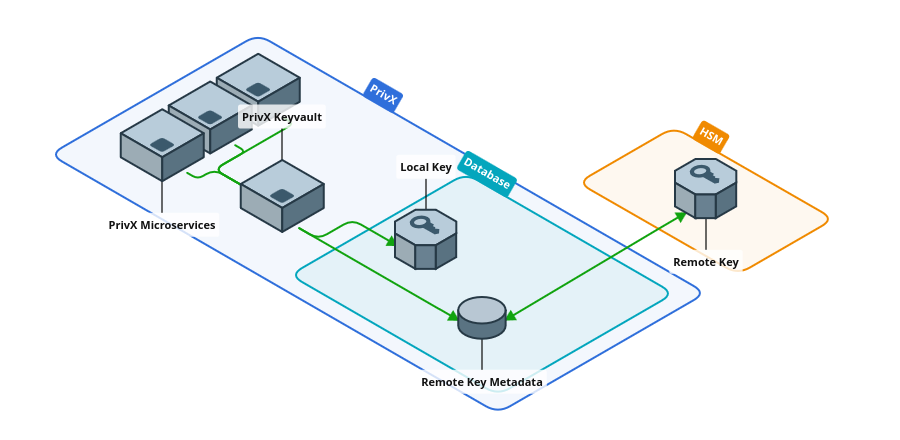
You can configure the storage locations of cryptographic keys after PrivX setup; the new locations are applied to subsequently created keys. Existing keys remain in their current locations and continue to work as before.
However, we recommend that symmetric key storage location is properly defined during installation: most symmetric encryption keys are not intended to be renewed and should be treated as unchangeable.
Remote Storage for Cryptographic Keys
Keys are stored on HSM. All encryption, decryption, and signing operations are performed remotely on the HSM. Only symmetric key metadata and the public parts of asymmetric keys are stored on PrivX. Stored asymmetric keys are encrypted using the PrivX instance secret.
Local Storage for Cryptographic Keys
Keys are stored locally on PrivX. The keys are always encrypted using the instance secret before being stored to PrivX Server(s) or the PrivX Database.
Configuring Storage for Specific Key Types
PrivX uses the initial setup storage options as defaults. After installation, you may change storage locations for specific keys per key prefix.
You can change storage locations on PrivX Servers in /opt/privx/etc/keyvault-config.toml. The settings asymmetric_key_storage and symmetric_key_storage are multiline strings where each line maps a key name prefix to a storage option. The following example stores principal keys and CA Keys (except the Extender CA Key) remotely and all other asymmetric keys locally:
asymmetric_key_storage = '''
/            local
/ca          remote
/ca/extender local
/principals  remote
'''
The prefix must match a specific /-separated substring exactly. For example, /pri does not match principal keys whose names begin with /principals/.
Common asymmetric key type prefixes include:
| Prefix | Description |
|---|---|
/ca | All CA Keys |
/ca/accessgroup | All Access Group CA Keys |
/ca/accessgroup/xxxxxxxx-xxxx-xxxx-xxxx-xxxxxxxxxxxx | Specific Access Group CA Keys by Access Group ID |
/ca/extender | Extender v1 CA Key |
/ca/icap | ICAP CA Key |
/ca/apiproxy | PrivX API Proxy CA Key |
/ca/dbproxy | PrivX Database Proxy CA Key |
/principals | Principal keys |
/sshmitm/hostkey | SSH Bastion Host Keys |
/extenderservice/hostkey | Extender Service Host Keys |
Restart PrivX Servers to apply your configuration changes.