Network Targets
Network targets allow PrivX users to access services or subnets using arbitrary TCP/IP protocols. Access to network targets is authenticated via PrivX.
Prerequisites
Your network must be configured to route all connections from PrivX users to target addresses via a PrivX router, as described in Preparing for Deployment.
Configuring Network Targets
Set up and/or manage network targets via the PrivX GUI, on Administration→Network Targets. Each network target must at least specify:
- A unique name.
- Roles, whose members may access the network target.
- Available Destinations. Destinations can be individual IP addresses, or IP ranges.
Connecting to Network Targets
To connect to a network target:
- Check the network targets available to you from Connections→Network Targets. Click an entry to allow connections.
Connections to the network target are allowed as long as the newly-opened network-session tab is open.
- You can now connect to the target device(s) using an appropriate client.
Examples of Network Targets
This section provides example network-target configurations for the following networks:
- Targets without NAT
- Targets with NAT
Network Targets without NAT
In this example, PrivX users from 192.0.2.0/24 network need to access targets in the 198.51.100.0/24 network. Targets are at addresses 198.51.100.1 and 198.51.100.2.
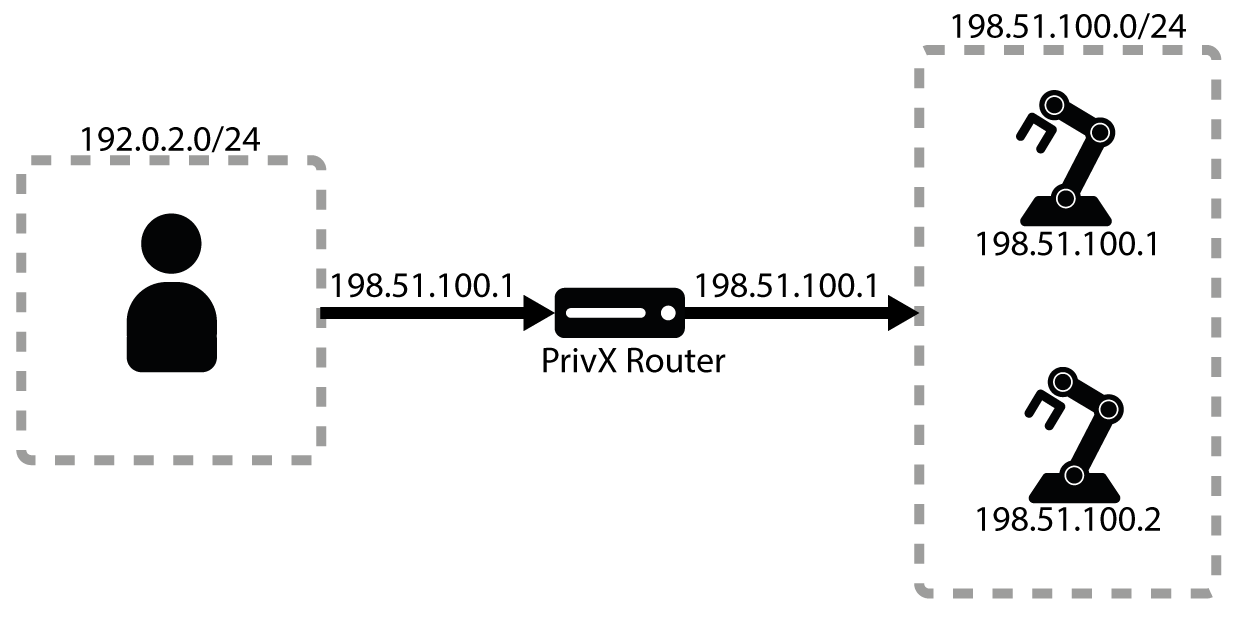
To configure access in this scenario, go to Administration→Network Targets and add a network target with the following requirements:
- Provide a unique name for the network target.
- Specify roles that may access this network target.
- Add a Destination with IP range start and IP range end at 198.51.100.1 and 198.51.100.2 respectively. Since the network does not use NAT, leave the NAT address and NAT port empty.
After you have set up the network target, allowed users can then connect to it as follows:
-
Go to Connections→Network Targets and click the new network target. This opens a network-session tab, which allows connections to the destinations.
-
Using an appropriate client, you can now connect to addresses 198.51.100.1 or 198.51.100.2.
Network Targets with NAT
In this example, the PrivX Router performs DNAT and SNAT. Targets in the 198.51.100.0/24 network are accessed via virtual-subnet addresses from the 203.0.113.0/24 range. The virtual subnet uses 1-to-1 mapping: the target 198.51.100.1 is accessed via 203.0.113.1, and 198.51.100.2 is accessed via 203.0.113.2.
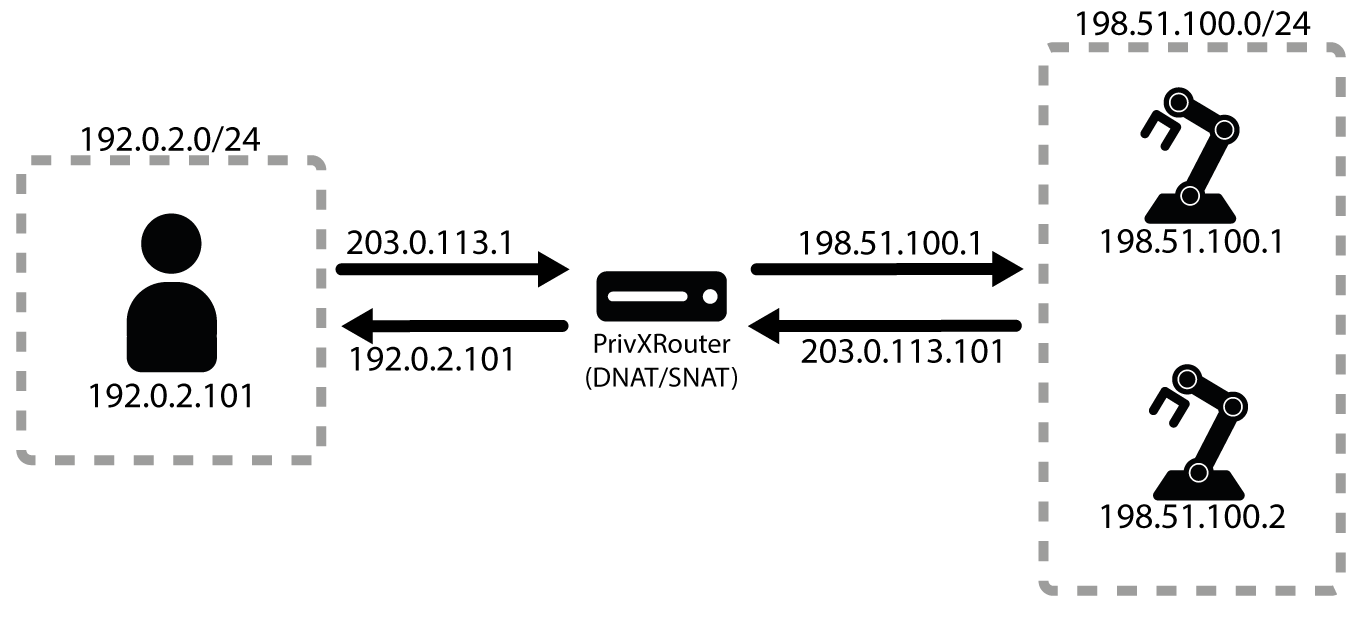
To configure access in this scenario, go to Administration→Network Targets and add a network target with the following requirements:
- Provide a unique name for the network target.
- Specify roles that may access this network target.
- Enable the Source NAT setting to also support SNAT. DNAT is supported by default.
- Add a Destination for first target with IP range start and IP range end at 203.0.113.1 and NAT address at 198.51.100.1 respectively.
- Add a Destination for second target with IP range start and IP range end at 203.0.113.2 and NAT address at 198.51.100.2 respectively.
After you have set up the network target, allowed users can then connect to it as follows:
-
Go to Connections→Network Targets and click the new network target. This opens a network-session tab, which allows connections to the destinations.
-
Using an appropriate client, you can now connect to targets at 203.0.113.1 or 203.0.113.2.